
Self-Hosting Plausible Analytics: A Privacy-Friendly Google Analytics Alternative
Google Analytics is the default choice for website analytics, but it comes with significant baggage: complex setup, GDPR compliance headaches, cookie consent banners, and the knowledge that Google is harvesting your visitors' data for ad targeting.
Photo by Markus Winkler on Unsplash
Plausible Analytics is a lightweight, open source alternative that gives you the metrics that actually matter — without any of that baggage.
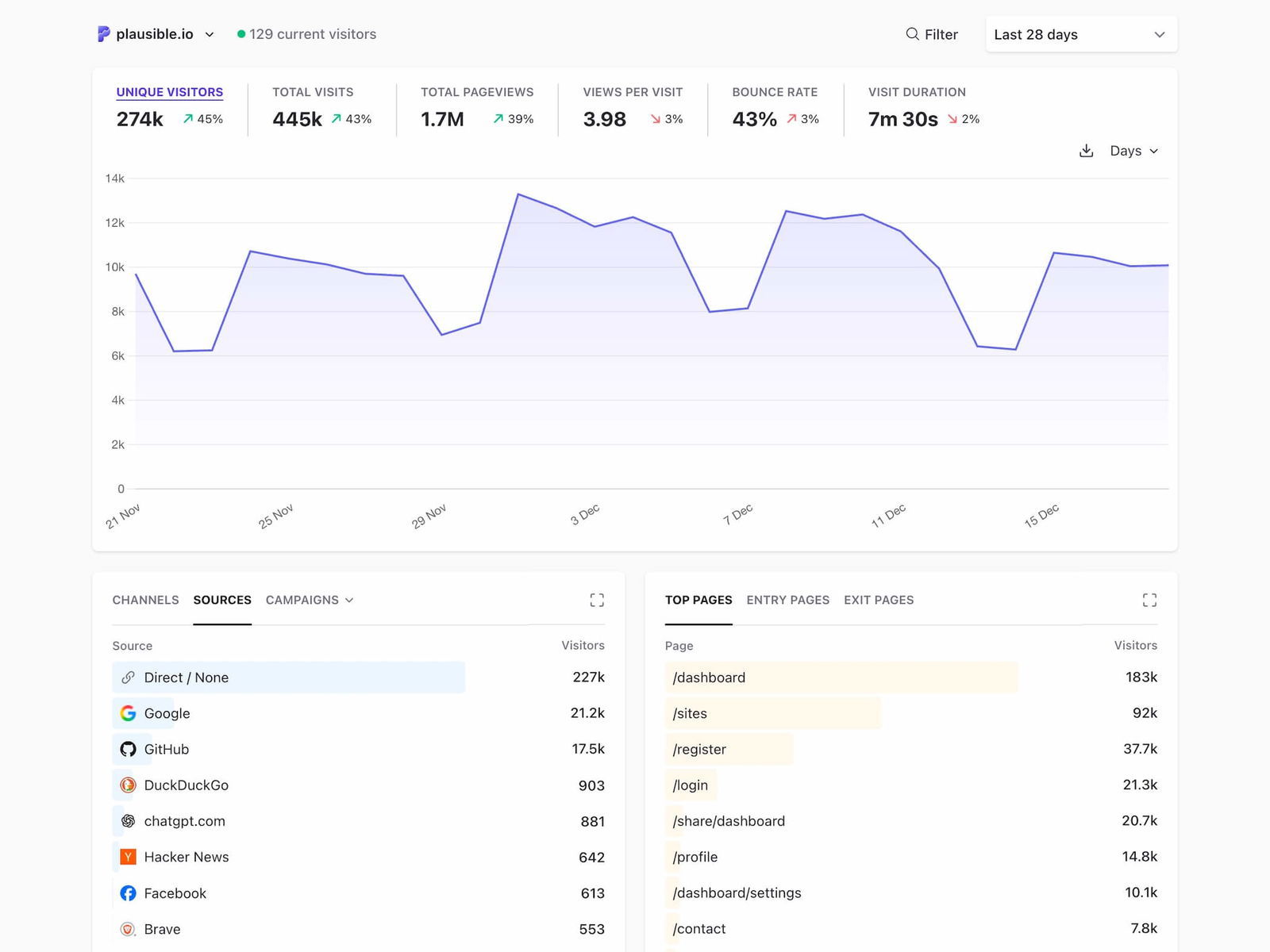
In this guide, we'll cover what Plausible offers, how it compares to Google Analytics, and how to self-host it on your own server.
Why Consider Plausible Over Google Analytics?
The case for switching
| Feature | Google Analytics | Plausible |
|---|---|---|
| Script size | ~45 KB | < 1 KB |
| Cookie usage | Yes (requires consent banner) | No cookies |
| GDPR compliance | Requires consent | Compliant by default |
| Data ownership | Google's servers | Your server |
| Dashboard complexity | Hundreds of reports | Single-page dashboard |
| Setup time | Hours of configuration | Minutes |
| Cost (self-hosted) | Free (you pay with data) | $5-10/month VPS |
When Google Analytics is still the better choice
Be honest with yourself about what you need:
- E-commerce tracking — GA's enhanced e-commerce features are mature and well-integrated with ad platforms.
- Ad campaign attribution — If you run Google Ads, the integration is hard to replicate.
- Large analytics teams — GA's report builder and custom dimensions serve complex organizations.
- Free tier requirements — If you can't spend anything, GA4 is free (for the standard version).
For most websites — blogs, documentation sites, SaaS landing pages, portfolios — Plausible gives you everything you need in a fraction of the complexity.
What You Get with Plausible
Plausible tracks the metrics that matter for most sites:
- Unique visitors and page views over time
- Bounce rate and visit duration
- Traffic sources — referrers, UTM parameters, search engines
- Top pages — which content gets the most attention
- Geographic data — country-level (without IP logging)
- Device/browser/OS breakdown
- Goal conversions — custom events like button clicks or signups
All of this is presented on a single, clean dashboard. No training required, no 47-click report builder.
Self-Hosting Plausible: What You Need
Server requirements
Plausible is efficient, but it does use ClickHouse for analytics storage, which needs some resources:
- Minimum: 2 GB RAM, 1 vCPU, 20 GB disk
- Recommended (for up to ~1M pageviews/month): 4 GB RAM, 2 vCPU, 40 GB disk
- OS: Any Linux distribution with Docker support
A $12-24/month VPS from providers like Hetzner, DigitalOcean, or Vultr will handle most sites comfortably.
Prerequisites
- A Linux server with Docker and Docker Compose installed
- A domain name pointed at your server (e.g.,
analytics.yourdomain.com) - Basic command-line familiarity
Want more analytics guides? Get guides like this in your inbox — Self-Hosted Weekly delivers one free deep-dive every week.
Step-by-Step Setup
1. Clone the hosting repository
Plausible provides an official self-hosting repo with everything configured:
git clone https://github.com/plausible/community-edition plausible-ce
cd plausible-ce
2. Configure environment variables
Copy the example config and edit it:
cp .env.example .env
Generate a secret key (this is used to sign sessions):
openssl rand -base64 48
Edit .env with your settings:
BASE_URL=https://analytics.yourdomain.com
SECRET_KEY_BASE=<your-generated-secret>
3. Start the services
docker compose up -d
This starts three containers:
- Plausible — the web application
- PostgreSQL — stores user accounts and site settings
- ClickHouse — stores analytics data (optimized for time-series queries)
4. Set up a reverse proxy
You'll want HTTPS in front of Plausible. With Caddy, it's a two-line config:
analytics.yourdomain.com {
    reverse_proxy localhost:8000
}
Caddy automatically provisions and renews Let's Encrypt certificates.
5. Create your account
Visit https://analytics.yourdomain.com and create your admin account. Add your site's domain, and you'll get a script tag to add to your site:
<script defer data-domain="yourdomain.com"
  src="https://analytics.yourdomain.com/js/script.js">
</script>
That's it. One script tag, no cookies, no consent banner needed.
Maintenance and Backups
Self-hosting means you're responsible for keeping things running. Here's a minimal maintenance routine:
Automatic updates
Pin to a specific version tag in docker-compose.yml and update periodically:
docker compose pull
docker compose up -d
Backups
Back up the PostgreSQL database regularly:
docker compose exec db pg_dump -U postgres plausible > backup.sql
ClickHouse data can be backed up by copying its data volume, though for most sites, losing historical analytics data is not catastrophic.
Monitoring
Set up a simple uptime check on your analytics domain. If it goes down, your tracking script will silently fail (it won't break your website), but you'll lose data during the outage.
Cost Comparison
| Scenario | Google Analytics | Plausible Cloud | Plausible Self-Hosted |
|---|---|---|---|
| Up to 10K monthly pageviews | Free | $9/month | ~$6/month (VPS) |
| Up to 100K monthly pageviews | Free | $19/month | ~$6/month (VPS) |
| Up to 1M monthly pageviews | Free | $69/month | ~$12/month (VPS) |
| Up to 10M monthly pageviews | Free (or GA360: $$$$) | $169/month | ~$24/month (VPS) |
The self-hosted option has a clear cost advantage at scale. Even at lower traffic, many people consider the privacy and simplicity benefits worth the VPS cost.
Migration from Google Analytics
Plausible can import your historical Google Analytics data:
- Export your GA data using Google Takeout or the GA API
- Use Plausible's built-in GA import tool (available in Settings)
- The import brings over visitor counts, traffic sources, and top pages
The import isn't perfect — GA and Plausible measure visitors differently (GA uses cookies, Plausible uses a hash of IP + User-Agent) — but it gives you continuity in your dashboard.
Verdict
Self-host Plausible if:
- You want simple, privacy-friendly analytics without cookie banners
- You're comfortable running Docker on a VPS
- You manage one or more websites and want a single dashboard
- You care about page load performance (< 1 KB script vs 45 KB)
Stick with Google Analytics if:
- You need deep e-commerce or ad attribution tracking
- Your organization requires GA's enterprise features
- You have zero budget for hosting
For the vast majority of websites, Plausible gives you the 20% of analytics features that provide 80% of the value — and it does so while respecting your visitors' privacy and keeping your data under your control.